Registering your works
Understanding the Musical Work Status
The page "My Musical Works" shows all your musical works that have been automatically synched from the artist profiles linked to your Bridger account.
NOTE: To correctly collect the related copyright royalties, you need to submit these works. Also, we need to know if there are any other co-creators for these musical works and what are their roles.
At Bridger, there are several different statuses that we use to inform you of the current stage of the activation process your musical works are in:
Example:
To be completed ⮕ In Process or Split approval is in progress or Processed with Bridger ⮕ Registration Accepted.
| You need to submit your work and indicate the splits | |
| This musical work has generated a conflict with another CMO/PRO or MRO when collecting royalties. To solve the problem and restart the collection, please get in touch with us as soon as possible support@bridgermusic.io | |
| You have submitted your musical works, and we are currently making sure we have all the information needed. We will get back to you if we need any additional information to validate your submission. | |
| You have added one or more co-creators for that musical work. We are currently waiting for the co-creators' approval or dispute. If you have any questions please contact us | |
| You’ve indicated that the musical work is “not an original creation." You need to send us the usage authorizations that apply to the musical work to start collecting the related copyright royalties. Without these authorizations, you will need to delete these musical works from your account. Contact us if you have any questions. | |
| Some information is missing in order for us to start collecting the copyright royalties generated by this musical work. Please contact us to fill the gaps. | |
| The submitted information have not been approved. Further review is necessary before we can start collecting your rights for this musical work. musical works, and we are currently making sure we have all the information needed. | |
| Your musical works have been correctly submitted and validated. |
Related articles:
Declare/Submit your musical works
Select and Submit your musical works to Bridger
After signing up with Bridger, there is still one key step to run before we can start collecting your copyright. We need to know about your ownership as a composer and as a lyricist for each of your musical works.
To select your musical works:
- Sign in to Bridger
- Select "My musical works" to access the list of your musical works. All the tracks with the status "To be completed" need your action.
- Select one or multiple musical works with the status "To be completed", then click on "complete these submissions".
Then, you will need to select one or two options for the selected musical works:
> Select "I am a writer and/or composer" (if you have contributed to the lyrics and/or the music composition) | |
> Select "I am a producer and/or performer" (if you have contributed to the sound recording of the musical work) | |
> Select "The selected content is original" (if your work is not an unauthorized cover or doesn't include any unauthorized sample or content of a preexisting work) | |
> Select "I don't have the full rights for this content" (If your work includes unauthorized sample or content of a preexisting work), then click on "Notify these musical works to Bridger." |
> If you select "I am a producer or performer," it means that you own the "master rights" of the sound recording for the selected musical work, but not the copyright (which is the only type of right that Bridger collects ; your master rights being collected by your digital distributor). To own the copyright, you must have composed the music and/or written the lyrics or the musical work. If it is not the case, you must:
- Click on "Delete these musical works"
> If you select "I'm a writer and/or a composer", it means that you are the music composer or the lyricist of the selected musical work, or at least one of the collaborators to the composition and/or the lyrics. You own the copyright that Bridger will collect for you.
First, we must ensure that the selected musical works are original . For example, you may cover a pre-existing literary or musical work or integrate excerpts, samples, etc., of pre-existing works into your creation. In that case, we will have to check that all necessary permissions have been granted from the original authors and publishers.
This process will be engaged when you will:
- Select "I don't have the full rights for this content"
- Click on "Notify these works to Bridger"
Following this action, our team will contact you.
> If you select "The selected content is original", you confirm that no pre-existing work is covered, mixed, or sampled in your selected work.
- Click "Next" and start the submission process.
To submit your selected works to Bridger, follow these steps:
This is the most critical step of your registration process for your musical works. Provide to Bridger the split (percentage) of ownership you have on each of them as a composer and/or as a lyricist. The copyright is divided into two types of rights:
- The performing rights are related to the authorization you give to the digital platforms through Bridger to broadcast your works publicly,
- The mechanical rights are related to the authorization you give to the digital platforms through Bridger to mechanically and digitally reproduce your musical works.
Both types of rights generate royalties that Bridger collects for you.
Once you have confirmed that you are the composer and/or lyricist of the selected musical works and that the selection is 100% original,
- Click "Next" to define the splits.
By default, you are considered as a songwriter of the musical work (composer and lyricist) and as 100% owner of the performing and the mechanical rights.
If this is correct and want to apply this setting as default:
- Click "Apply this split to the entire musical work selection"
- Then click "Submit" for each musical work
- Once all the musical works are selected and have been submitted individually, select "I confirm that the information provided is correct and complete"
- Finally, click "Submit" to complete the registration of the musical works selection
If this is not correct because you have composed the music and/or written the lyrics with other people:
- Click "Add a new contribution" as many times as there are other contributors on the musical work
- Click in the contributor field; a list of potential contributor will be displayed
- If you type in the contributor field the first letters of your collaborator's name (or the name of their musical project), the list will be narrowed down accordingly.
- If you don't find the correct collaborator, go to the bottom of the list and select "Add"
- In the frame "Add a contributor" enter the first and last names of your collaborator, their email address, and the Collective Management Organization to which they are affiliated (if you know it). Click "Send"
- Back in the "Splits" frame of your musical work, choose your collaborator's role (songwriter, composer, or lyricist) and update their role if necessary
- Check the splits of performing and mechanical rights and update them if necessary
- Repeat this step with all the contributors
- As an option, you can select "Apply this split to the entire musical work selection" and click "Submit"
- Once all the selected musical works are submitted, click one last time on "Submit" to complete the registration of the entire selection.
NOTE: An email will be sent to each of your collaborators for them to approve the splits you submitted.
After submitting a selection of your musical works, you will still have 48 hours to update any element in the registration of each work. After this time, you will need to contact our team directly to make any update.
Relates articles:
Understanding copyright royalties
Add a new artist profile to your Bridger account
Add a new work to your repertoire
Related blog articles:
I made a track with my friends; how do we split the royalties?
Understanding royalties splits
If you have composed and/or written the lyrics of a musical work with others, each one is considered as a co-creator and has a share of ownership.
This will determine how performing and mechanical rights (the two parts of copyright) will be split between the co-creators.
Based on the importance of each person’s contribution to the creation of the musical work and its promotion, a percentage of performing rights and a percentage of mechanical rights needs to be defined and agreed upon by each co-creator.
The split will be applied for the royalty collection of the musical work and distributed as declared between the co-creators.
Related articles:
 Declare/Submit your musical works
Adding co-authors
To add a co-author to one or multiple musical works follow the following steps:
- Sign in to your Bridger account.
- Click on "My musical works" to get the list of your musical works. All the musical works with the status "To be completed" need an action to be done.
- Select one or more musical works with the status "To be completed" by ticking the box on the left side of the list. Click on "complete these submissions".
Then, you need to select one or two options regarding the selected musical works:

> Select "I am a writer and/or composer" if you have contributed to the lyrics and/or the music composition.
> Select "I am a producer and/or performer" if you have contributed to the sound recording of the work.
>Select "The selected content is original" if your work is not an unauthorized cover or doesn't include any unauthorized excerpt of a preexisting literary and/or musical work.
> Select "I don't have the full rights for this content" if your work is an unauthorized cover or includes an unauthorized excerpt of a preexisting literary and/or musical work. Click on "Notify these musical works to Bridger"
- Click "Next" to define the splits.
By default, you are considered as a songwriter of the musical works (both composer and lyricist) and 100% owner of the performing and the mechanical rights.
If this is correct and want to apply this set up as default ownership:
- Click “Apply this split to the entire musical work selection”
- Click “Submit” for each musical work
- Once all works are selected and have been submitted individually, tick the box “I confirm that the information provided is correct and complete”
- Finally, click "Submit” to complete the registration of the entire selection of your musical works.
If this is not correct because you have composed the music and/or written the lyrics with others:
- Click "Add a new contributor" and search for a contributor's name on the list. If you can not find the contributors on the list, add their first and last names, emails, CMOs). Click "Next".
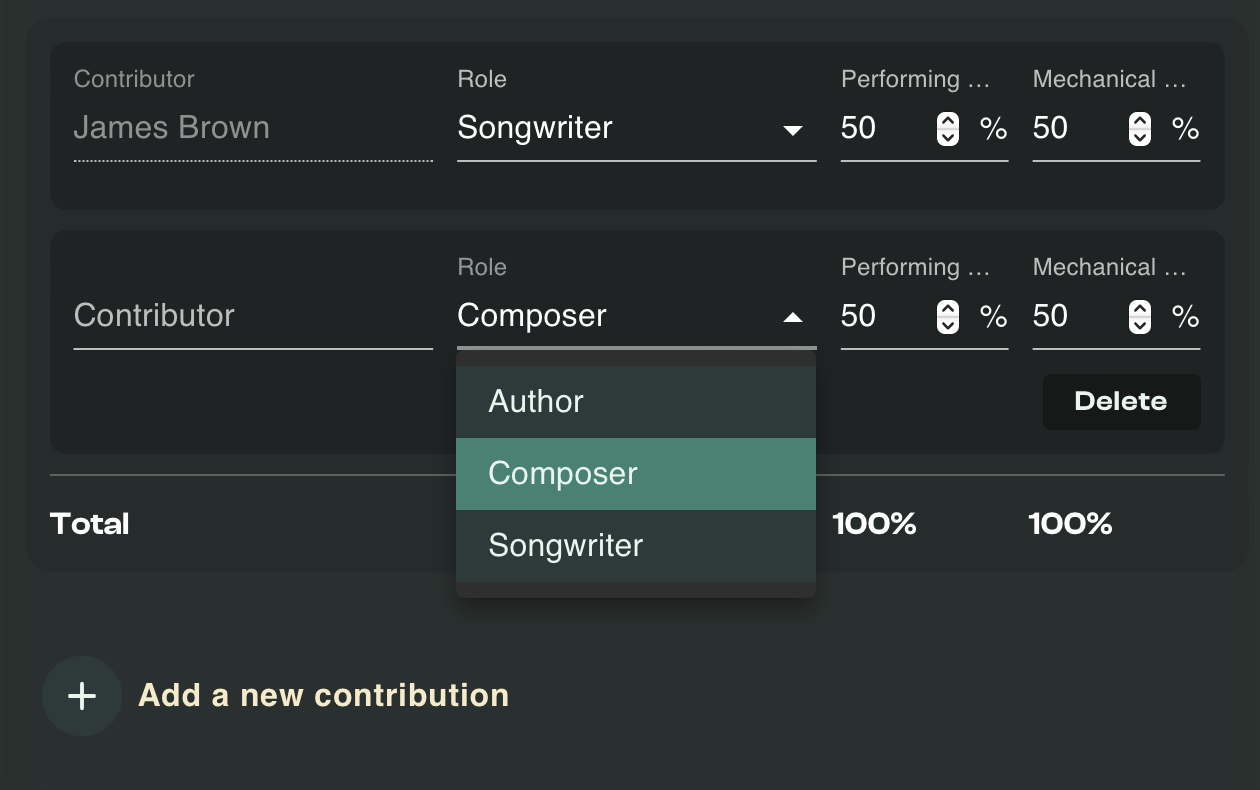
- Select "Apply this split to the entire track selection" to update your musical works selection and click "Submit".
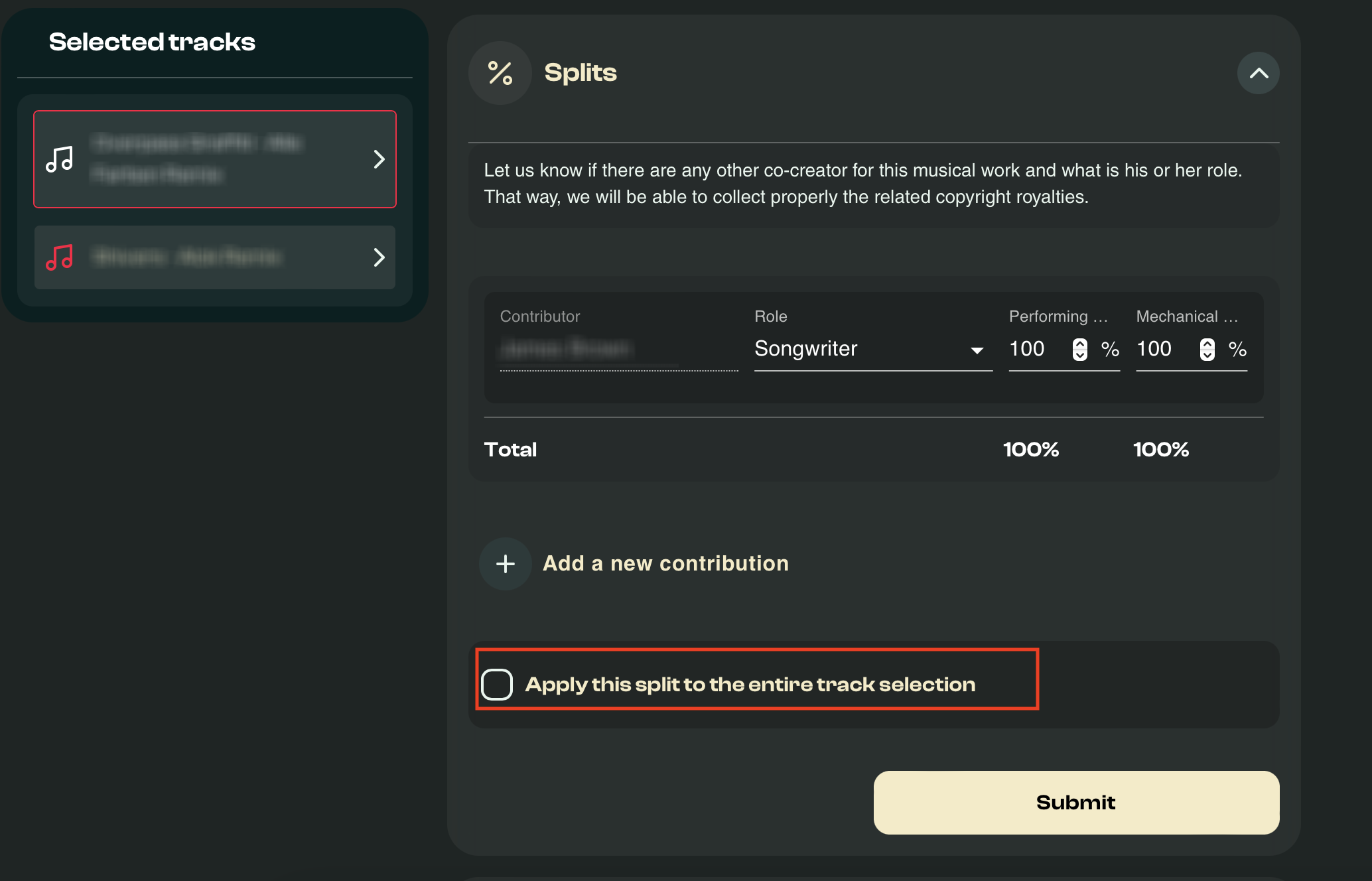
NOTE: an email will be sent to each of your collaborators for them to approve the splits and percentages of rights you registered.
After submitting musical works, you have 48 hours to make updates from your account. After that time, you'll have to contact our team to make any changes.
Related articles:
Understanding copyright royalties
Related blog articles:
I made a track with my friends, how do we split the royalties?
Understanding copyright royalties
On each musical work you create, alone or with other people, you own a copyright. To define this concept, consider that you own the right to authorize the public performance and the mechanical or digital reproduction of your musical works.
Good news is that this authorization can be monetized. Indeed, without your permission, Spotify, Apple, Amazon, and the other DSPs cannot broadcast your musical works on their platforms. It would be an infringement of the copyright laws. The mandate you sign with Bridger acts like this: in your name, we negotiate with each digital service provider the proportional value of this authorization for commercial exploitation of your musical works, and we collect the royalties generated by it.
Relevant Blog articles:
What's the difference between copyright and master rights?
Relevant other articles: